Learn DevOps From Your Terminal: The DevOps Daily CLI and SSH App
You spend most of your day in a terminal: SSH sessions, kubectl, git, logs. Switching to a browser to learn something new breaks that flow. So we put DevOps Daily in the terminal too. You can read the posts, play the quizzes, study flashcards, tick off checklists and solve the incident of the day from the same window where you run your commands.
There are two ways in. ssh ssh.devops-daily.com works right now with nothing to install. The devops-daily CLI is a small open source binary for macOS, Linux and Windows that keeps your quiz scores and flashcard progress and works offline. This post shows both, what you can do with them, and how they are built.
TL;DR
- Try it now:
ssh ssh.devops-daily.com. No account, no password, any SSH key or none. - Install the CLI with Homebrew, npm, Go or a one-line install script. The command is
devops-daily; Homebrew, npm and the install script also add the short aliasddy. - It has 369 posts, 47 quizzes, 27 flashcard decks, 24 checklists, a daily incident, and links to our 68 games and simulators.
- No telemetry and no account. After the first sync it works offline.
- The code is open source under the MIT license: The-DevOps-Daily/devops-daily-cli.
Prerequisites
- A terminal with an SSH client for the SSH app. Every macOS and Linux machine has one, and so does Windows 10 and later.
- For the CLI: macOS, Linux or Windows on amd64 or arm64, plus Homebrew, npm or Go if you want to install it that way.
Try it over SSH first
Run this from any terminal:
ssh ssh.devops-daily.com
You get the home screen of the app:
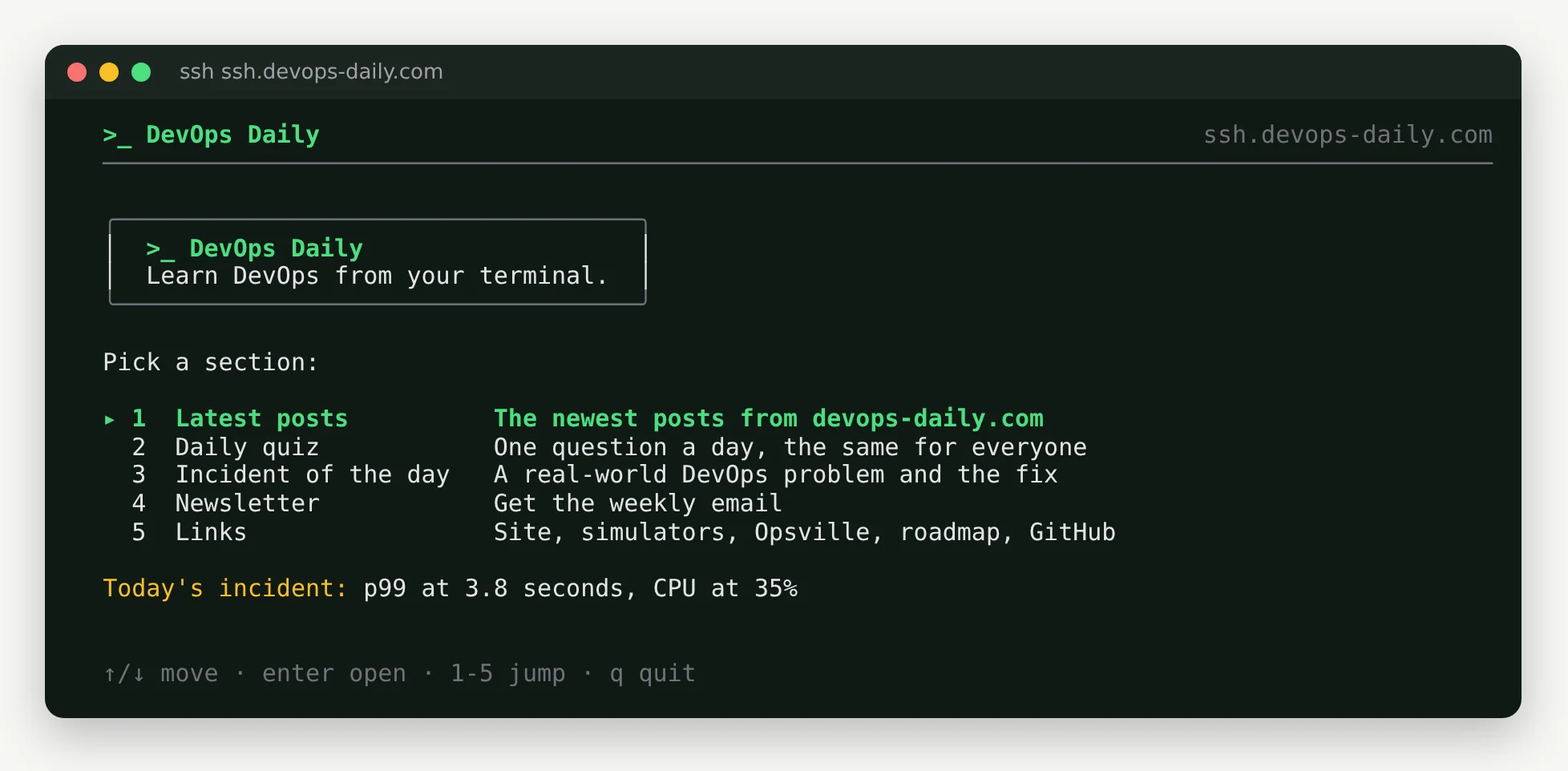
Use the arrow keys or the numbers to move, Enter to open a section and q to quit. Over SSH, the latest posts show a summary and a link (the CLI reads them in full), the daily quiz has one question that is the same for everyone that day, and the incident of the day is a real-world problem with four possible fixes.
The first time you connect, SSH asks you to confirm the server's host key. Check that the fingerprint matches this one before you type yes:
ED25519 key fingerprint is SHA256:foWFYF2OcGurRwunAlzGTHrpARFN+VfBRDZdmiZ0zf8.
It is an app, never a shell. The server accepts any key or no key, does not store or log keys, and refuses everything except an interactive session: no commands, no SFTP or scp, and no port forwarding. Sessions end after 10 minutes without a key press or 30 minutes in total, and each address can open 10 new connections per minute. If you have not thought about how SSH can be exposed safely before, the SSH hardening checklist is a good companion read.
Install the CLI
Pick the way you install other tools.
Homebrew on macOS or Linux:
brew install The-DevOps-Daily/tap/devops-daily
npm, or npx to try it without installing:
npm install -g @devopsdaily/devops-daily-cli
npx @devopsdaily/devops-daily-cli
Go:
go install github.com/The-DevOps-Daily/devops-daily-cli/cmd/devops-daily@latest
On macOS or Linux, the install script downloads the release for your system and checks it against the published checksum. On Windows, use npm, Go or the ZIP file from the releases page.
curl -fsSL https://raw.githubusercontent.com/The-DevOps-Daily/devops-daily-cli/main/install.sh | sh
As with any curl | sh, read the script first if you prefer; it is short. Every release on GitHub has a checksums.txt and a build provenance attestation, so you can check where a binary came from:
gh attestation verify devops-daily_0.1.0_linux_arm64.tar.gz -R The-DevOps-Daily/devops-daily-cli
What you can do
Run devops-daily with no command for the same home menu as the SSH app. Every section also has its own command:
| Command | What it does |
|---|---|
posts [--tag k8s] |
List posts, newest first |
read <slug> |
Read a post in the terminal, with its links at the end |
quiz [topic] |
Play one of the site's quizzes; your best score is kept |
flashcards [deck] |
Study a deck with simple spaced repetition |
checklist [name] |
Tick off a checklist; your progress is saved |
incident [--fix] |
Today's real-world incident, then the fix |
play [simulator] |
Open a simulator, a game or Opsville in your browser |
sync |
Download the latest content now |
Names are forgiving. devops-daily quiz docker, devops-daily play dns and devops-daily read terraform-state find the closest match, or list the candidates when there is more than one.
The first sync downloads everything at once, then posts are a list away:
The incident of the day describes a real production problem and asks what you would do:
Make your pick, then run devops-daily incident --fix for the answer, why each wrong option is wrong, and a link to a post that goes deeper. For hands-on practice, the simulators cover many of the same problems.
Quizzes, flashcards and checklists are the same ones as on the site: the quizzes, the flashcard decks and the checklists. In the terminal, your best quiz scores, flashcard schedule and checklist ticks are saved on your machine, so you can stop and pick up where you left off.
When something is easier to learn by doing, devops-daily play opens it in your browser: play dns opens the DNS simulator, and play opsville opens Opsville, our DevOps town game.
Offline and private
After the first sync, the CLI works without a network connection. Content lives in a cache directory (~/.cache/devops-daily on Linux) and your progress in a state directory (~/.local/state/devops-daily). Set DEVOPS_DAILY_OFFLINE=1 to turn off the automatic content refresh (an explicit sync, update or play still uses the network), and NO_COLOR if you want plain output.
There is no telemetry and no account, and your progress never leaves your machine. The CLI downloads public content files from devops-daily.com, and asks GitHub for the latest version only when you run devops-daily update. Like any download, those requests carry your IP address and the CLI version, and nothing else about you.
How it is built
The CLI and the SSH app are one Go codebase with two front doors. Both use the same screens, built with Bubble Tea and Lip Gloss. Posts render in the terminal with Glamour, and the SSH server runs on Wish, which serves a Bubble Tea app to every SSH session instead of a shell.
The site is static, so there is no API server to run. When devops-daily.com builds, it also writes small JSON files under /cli/v1/: the post index, post bodies, quizzes, decks, checklists and incidents. The CLI downloads those files and caches them. The format is documented in the repository, so you can build your own tools on top of it.
Releases are built with GoReleaser for six platforms, with checksums and build provenance attestations. The npm package is published from GitHub Actions with npm trusted publishing, so the release workflow stores no long-lived npm token.
What is next
This is version 0.1.0. Next on the list:
- Sign in with your DevOps Daily account, so quiz XP, roadmap progress and Opsville stats follow you between the browser and the terminal.
- Small checks you can use every day: TLS certificates, DNS records, HTTP security headers and email authentication (SPF, DKIM and DMARC) for a host or domain.
- A terminal game in the spirit of Opsville, with incidents to fix from your keyboard.
If you find a bug or want a command, open an issue on the GitHub repository. And if you want a new post, quiz or incident in your terminal every week, subscribe to the newsletter.
Summary
ssh ssh.devops-daily.comis the fastest way to try it, with nothing to install.brew install The-DevOps-Daily/tap/devops-daily(or npm, Go or the install script) gives you the CLI, with saved progress and offline use.- Run
devops-dailyfor the menu, or jump straight in withposts,quiz,flashcards,checklist,incidentandplay. - It is open source, has no telemetry, and needs no account.
Try it hands-on
Run the commands from this article in the browser. Nothing to install.
We earn commissions when you shop through the links below.


Bitrise
Managed runners for GitHub Actions
Bitrise Build Hub runs your GitHub Actions jobs on M4 Macs and AMD Linux machines. Change runs-on and keep your workflows, secrets and logs on GitHub.


Atomsized
AWS platform engineering and GitOps
Design and automation for reliable AWS and Kubernetes platforms, safer delivery workflows, and preview and UAT environments your engineers can understand and own.

DigitalOcean
Cloud infrastructure for developers
Simple, reliable cloud computing designed for developers

DevDojo
Developer community & tools
Join a community of developers sharing knowledge and tools

SMTPfast
Developer-first email API
Send transactional and marketing email through a clean REST API. Detailed logs, webhooks, and embeddable signup forms in one dashboard.

QuizAPI
Developer-first quiz platform
Build, generate, and embed quizzes with a powerful REST API. AI-powered question generation and live multiplayer.
Want to support DevOps Daily and reach thousands of developers?
Become a SponsorTags
Found an issue?
Related Posts
Also worth your time on this topic
OpenTelemetry Collector Custom Builds: 6.5x Smaller, and What Resource Detectors Cost at Startup
We built a small Collector with ocb and started it next to the contrib release on a droplet, in two network namespaces and on a Raspberry Pi, 5 times per case. The custom build is 6.5x smaller and holds under a quarter of the memory. Cloud detectors for clouds the host is not on held startup for the full 5 s timeout, even on another cloud, and one detector stopped the Collector from starting at all.
Using grep for Text Search
How do you use grep to search for text patterns in files? What are some useful flags?
junior
CI/CD Pipeline Setup Checklist
Step-by-step checklist for a production-ready CI/CD pipeline: source control, builds, tests, security scans, deploy gates, secrets, and rollback paths.
1-2 hours